Your shell, plus a prompt that knows more.
Everything you type goes to your real shell. Start a line with ' and OXIS takes it: more than 60 built-in commands for files, themes, tasks, workflows, plugins and workspaces.
try
OXIS is a development workspace around the shell you already use — PowerShell. Tabs and split panes, a built-in editor, per-project workspaces, and Lua for everything else.
Free and open source · Apache 2.0 · all downloads
01 / what it is
OXIS starts your actual shell in a real pseudo-console and leaves it alone. Your profile, aliases and prompt load as usual. Around it, OXIS puts the things you would otherwise juggle across several apps — tabs, split panes, an editor, a workspace per project — and makes every one of them scriptable in Lua.
Anything that doesn't start with ' goes straight to it — REPLs, prompts and full-screen programs like vim and htop included. A different shell per tab.
A workspace links the project's folder and Git remote, and carries its own tasks, workflows and plugins. Home shows it all at a glance.
Commands, workflows, keymaps, events and Home panels are plain Lua 5.4. Save, and it reloads. Plugins declare their permissions.
02 / try it
A working miniature of the app. Scroll through it, or click in and use it — nothing here runs on your machine.
Everything you type goes to your real shell. Start a line with ' and OXIS takes it: more than 60 built-in commands for files, themes, tasks, workflows, plugins and workspaces.
Split as far as you like; each tab and pane opens in the folder you're working in. 'broadcast types into every pane at once. Drag the dividers — they're real.
npm run scripts, SSH hosts and make targets'edit opens any file next to the prompt — file tree, tabs, a minimap, live problems and suggestions from language servers. There's a typo in cart.ts: find the squiggle and fix it. Or open the README for a live preview.
src/app.ts:12:5 in a compiler error to open it right thereHome is the workspace's start page: its folder, Git remote and plugins, the tasks you run most — one click each — and what changed today. Switch projects on the left; run a task.
oxis.dashboardWrite a plugin in OXIS's own editor, save, and it's live. Change the message in hello.lua, press Ctrl+S, then run 'hello. Add another oxis.command — that works too.
The page reads oxis.command and oxis.echo from your code; OXIS runs real Lua 5.4, with LuaRocks and C modules.
'market install adds a plugin; each runs in its own Lua VM with the permissions it declares. Pick one — these are recordings of the real plugins.
OXIS Mobile brings an assistant along. With your permission it reads the workspace's context — the branch, what changed, the last error — and explains it in plain words. Ask it about the failing test.
The assistant's chat lives in OXIS Mobile for iPhone and Android, paired with OXIS on your computer.
03 / in the box
One native program, written in Rust and drawn by the GPU — Direct3D 12, Vulkan or Metal. Lua 5.4 is inside. Nothing to install beside it.
PowerShell, Git Bash, WSL or cmd on Windows; your $SHELL on Linux. 'shell gitbash opens a tab with another.
04 / themes
Pick one — the whole page follows, the O above included. In OXIS, 'theme set <key> <value> changes anything live and keeps your own copy.
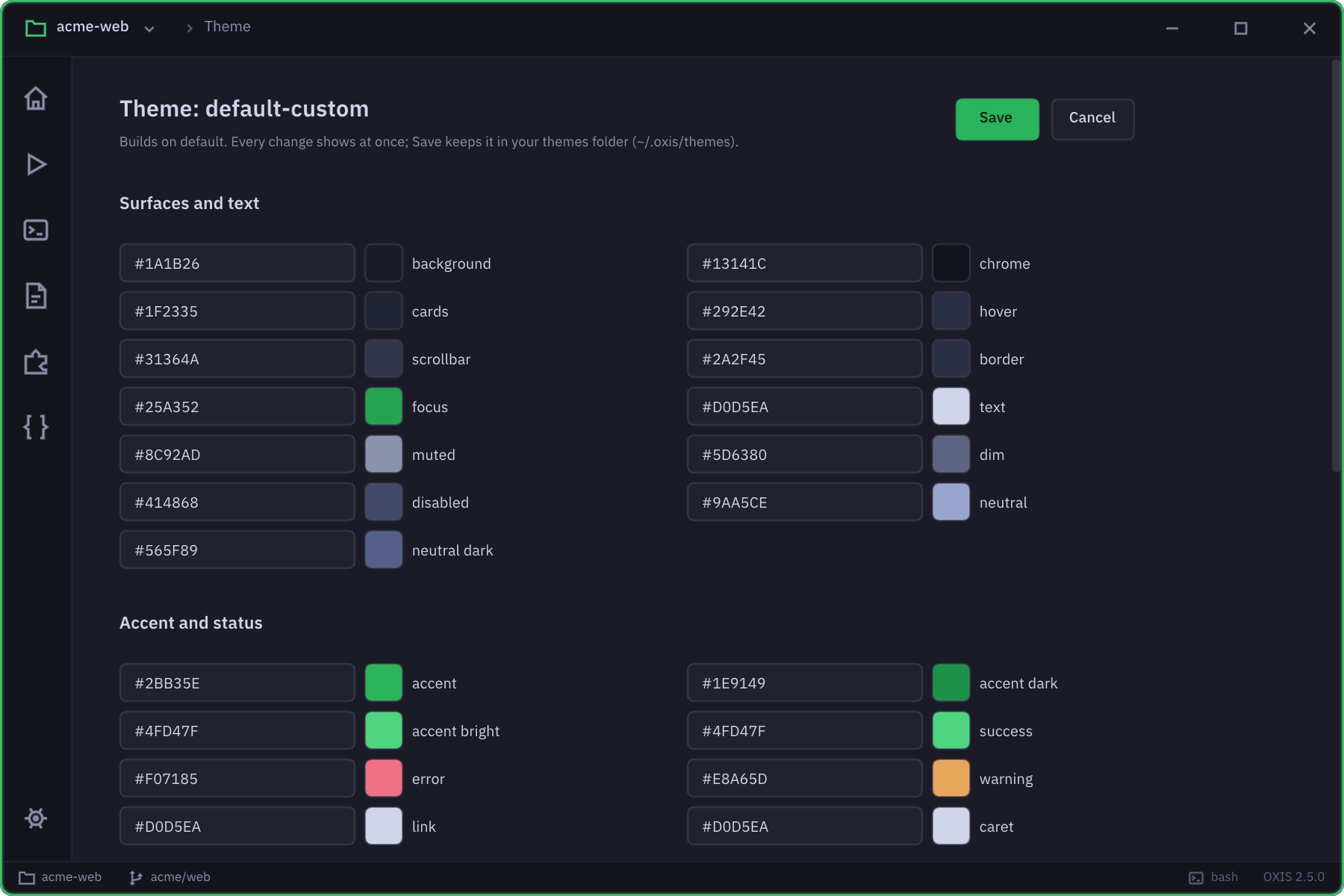
'theme edit — every colour and option, with a live preview: fonts, spacing, glow, background images and gradients.{ "name": "harbour", "extends": "slate", "purple": "#5cc8ff", "purple2": "#2f8fd8", "success": "#7ee787", "statusBg": "#1f6fb2", "font": "'Fira Code', monospace", "fontSize": 14, "ligatures": true, "promptText": "⚓ ❯", "glow": 0.25, "cursorStyle": "bar", "radius": 6 } // 'theme import harbour.json · or live: 'theme set glow 0.45
Themes are just JSON. Drop files in ~/.oxis/themes/, extend a built-in with "extends", or 'theme import one. Unknown keys are reported, never fatal.

05 / straight from the app
06 / market
Every free plugin is a plain, readable Lua script — read it, fork it, or install it with 'market install <name>. Publish yours with 'plugin publish, which files it for review. Premium plugins will be monthly subscriptions via Stripe; none can be bought yet.
07 / oxis mobile
Pair your phone with OXIS by scanning a QR code. Then watch your terminals live, run commands, switch workspaces, read and edit files, and get a notification when a long build finishes or something fails. An assistant comes too: ask it about errors, Git, Rust or your shell.
Free. Needs OXIS on your computer with Settings → Mobile connection turned on.
08 / install
Downloads come from oxis.space, signed and checked.
The installer (no administrator needed: it adds OXIS to the Start menu, your PATH and Explorer's Open in OXIS), or the program alone.
'help, or just start typing commands you already know.'update install keeps you on the newest release from then on.PS> Invoke-WebRequest https://downloads.oxis.space/ -OutFile oxis.exe PS> .\oxis.exev1/ releases/ …/ oxis-windows-x64.exe
A .deb for Debian and Ubuntu, or the program alone. X11 or Wayland, with Vulkan (or OpenGL ES 3).
chmod +x the program and run it.$SHELL — bash, zsh or fish.$ curl -LO https://downloads.oxis.space/v1/ $ sudo apt install ./oxis_amd64.deb $ oxisreleases/ …/ oxis_amd64.deb
Not released yet: there's no Mac build until OXIS has been built and used on a Mac. Build it from source for now (Rust stable; see From source).
chmod +x oxis-macos-arm64.$SHELL — zsh by default.% curl -LO https://downloads.oxis.space/v1/ % chmod +x oxis-macos-arm64 && xattr -d com.apple.quarantine oxis-macos-arm64 % ./oxis-macos-arm64releases/ …/ oxis-macos-arm64
The code and its whole history are on oxis.space/source: browse it, or download it.
Rust (stable). On Linux also the X11, Wayland and ALSA headers: libx11-dev libxkbcommon-dev libxcursor-dev libxrandr-dev libxi-dev libwayland-dev libasound2-dev. On macOS, Xcode's command line tools.
cargo run --release -p oxis-app builds and opens OXIS.cargo test --workspace runs the tests, window tests included.'update can tell how far behind it is.$ curl -LO https://downloads.oxis.space/v1/ source/ oxis.bundle $ git clone oxis.bundle oxis && cd oxis $ cargo run --release -p oxis-app # → target/release/oxis
Checking for the latest release…
09 / questions
$SHELL on Linux, including zsh and fish; 'shell <name> opens a tab with another, and OXIS_SHELL changes the default. Your profile, aliases and prompt load as usual, and anything not starting with ' goes straight to the shell.'config set updateCheckOnStartup false turns that off), to browse the Market, and for requests your plugins make — which need the net permission. 'update install counts itself in the public download total once a day ('config set countInstalls false turns that off).'update, OXIS asks oxis.space whether there's a newer release, signed with the OXIS release key. 'update install downloads it, swaps it in and puts the old one back if the new one fails to start. A build from source follows its branch instead. 'version shows the version, the commit it was built from, your system and your shell.~/.oxis/config.lua runs at startup, themes are JSON files in ~/.oxis/themes/, each project can carry a .oxis/workspace.lua, and 'backup / 'restore move everything between machines.get started
Install OXIS, open your project, and type 'help.